Learning apps · school workspaces · family subscriptions

Learning apps
for schools
and families.

Schools can assign Simu Primary, Simu JHS, vMaths, Simu Science Lab, and Stories App through the school workspace. Families can also subscribe directly for their children, with child access managed separately from school-owned data.

Free for schools The school operations suite is 100% free — schools only pay for the optional learning apps.
5
Flagship student apps
14
School apps and modules
1PIN
Student login across the suite
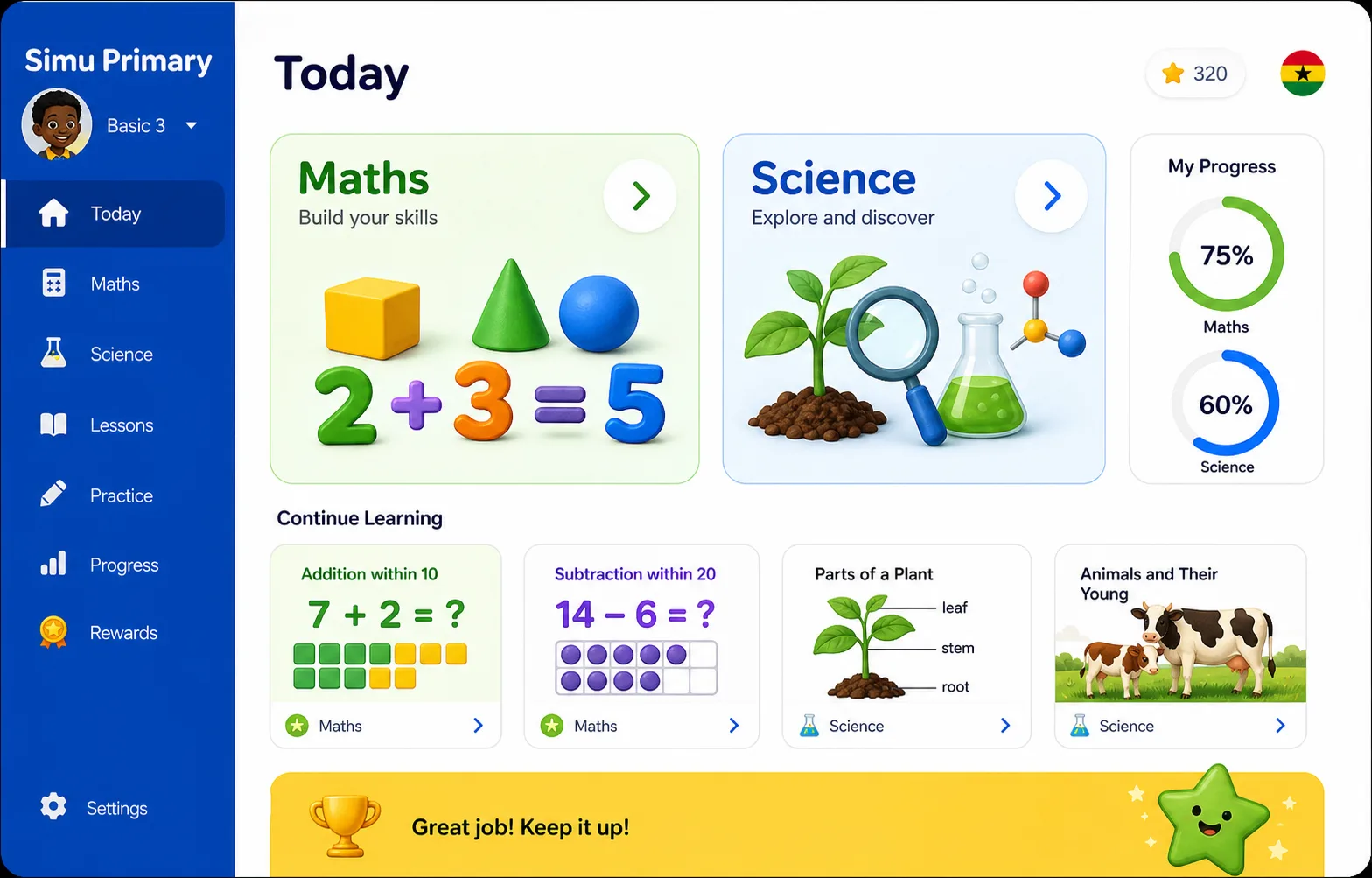
Simu Primary screenshot with maths, science, progress, and lesson cards
Simu Primary Maths and science for Basic 1-6.
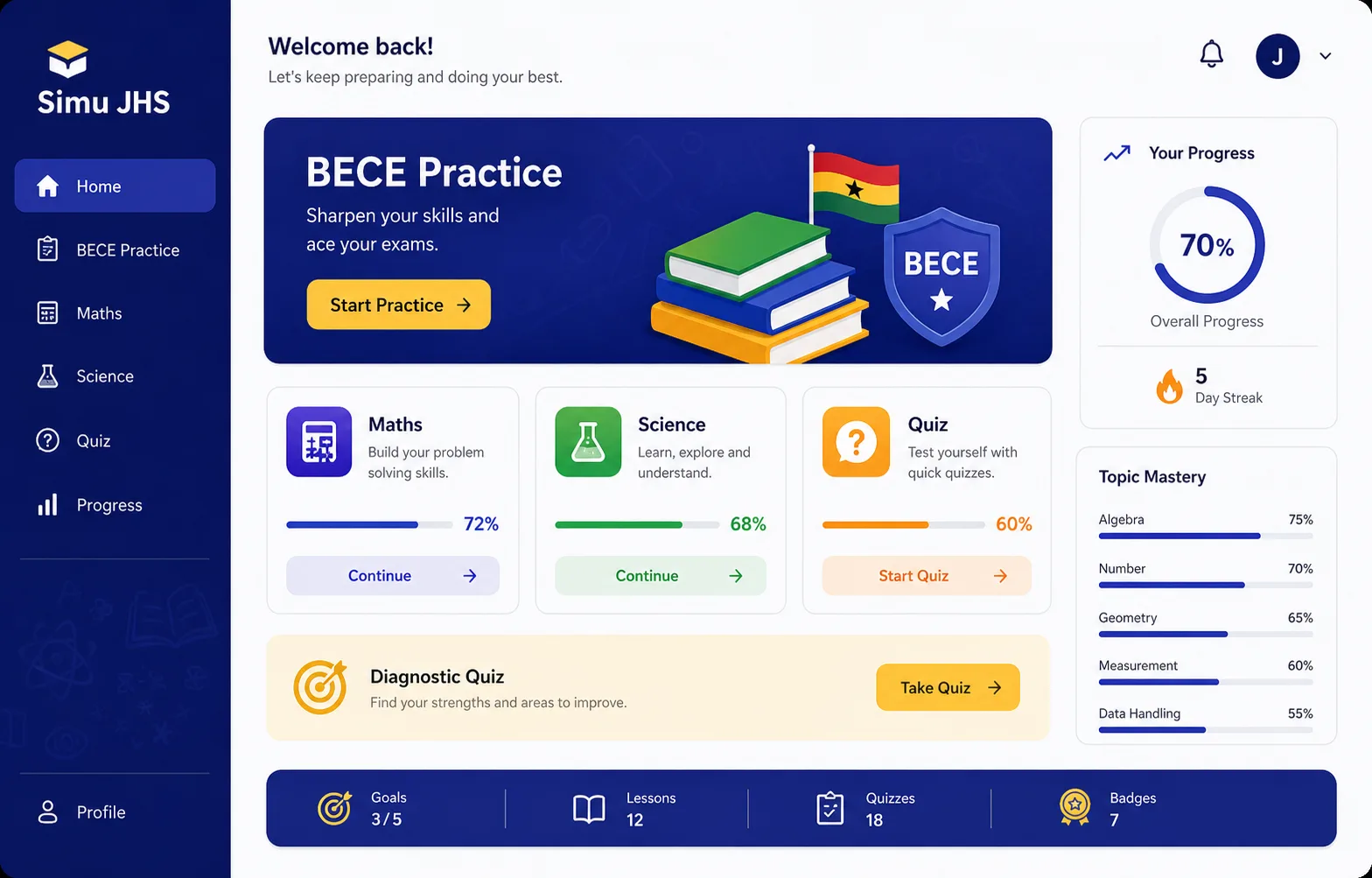
Simu JHS screenshot with BECE practice, maths, science, quizzes, and progress
Simu JHS BECE-ready practice for JHS learners.
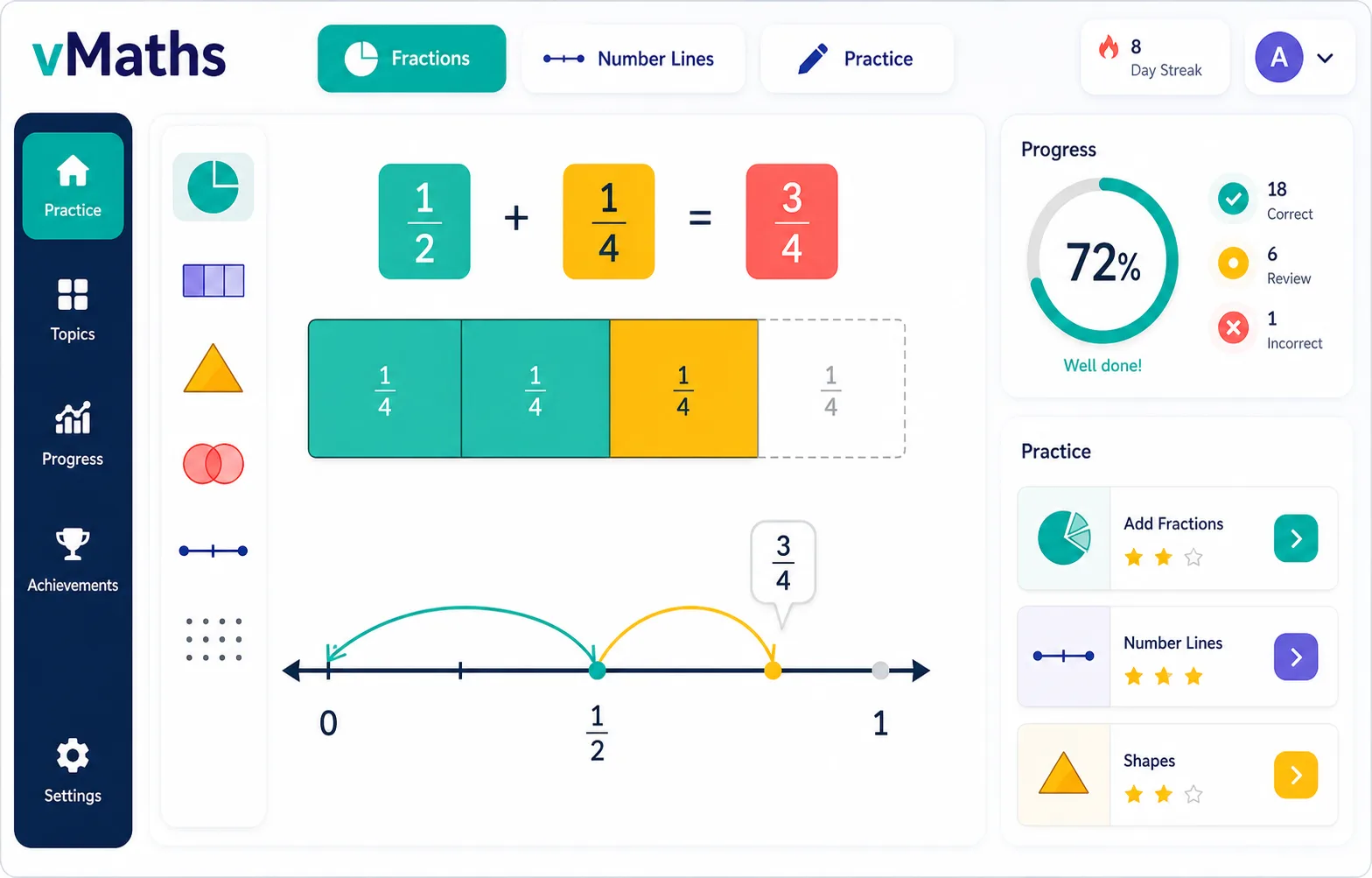
vMaths screenshot with fraction bars, number lines, visual manipulatives, and progress
vMaths Visual maths that students can manipulate.
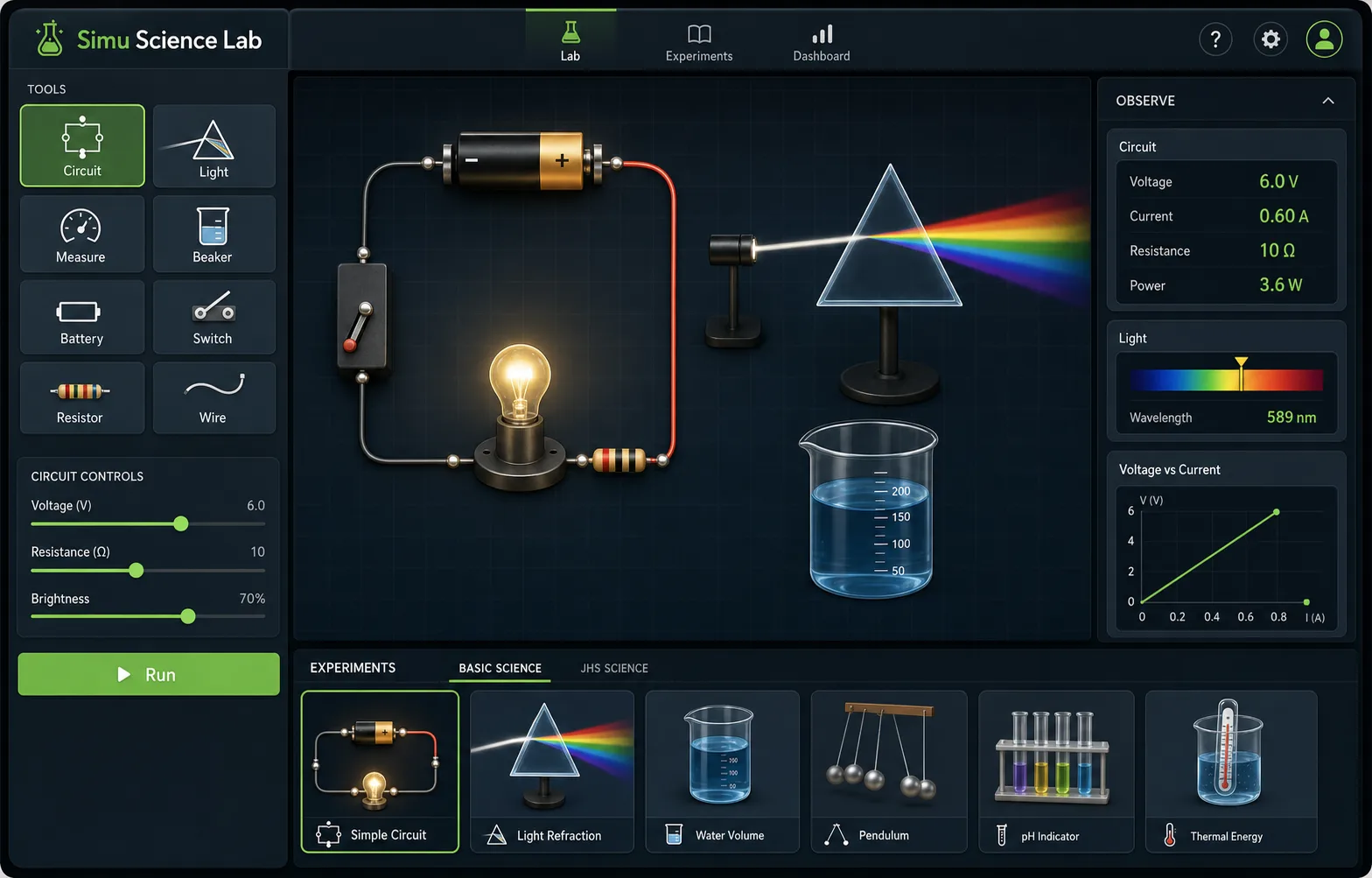
Simu Science Lab screenshot with a circuit builder, light refraction, controls, and observations
Simu Science Lab Virtual experiments for schools without a full lab.
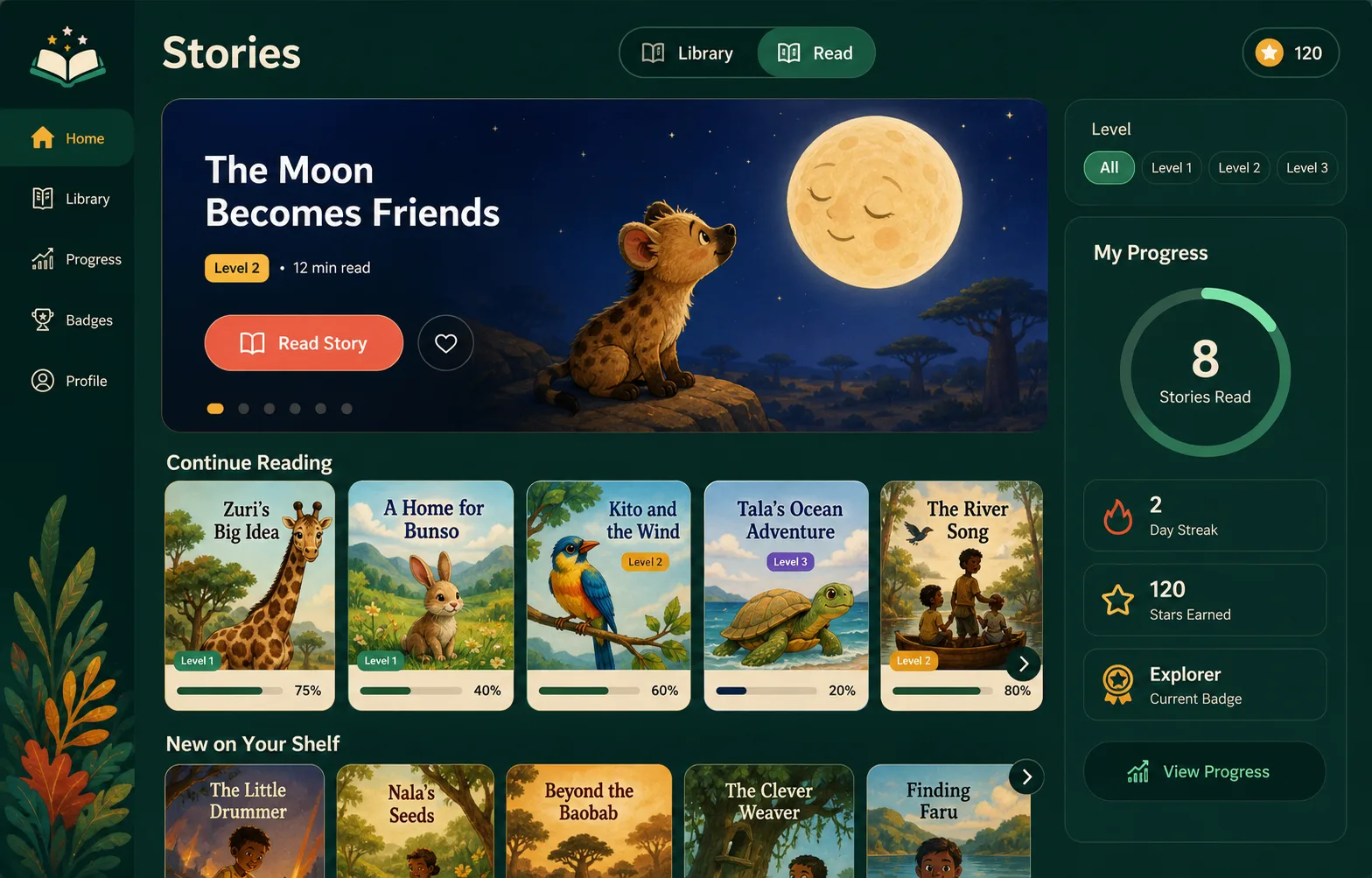
Stories App screenshot with a digital library, reading levels, story cards, and progress
Stories App A reading shelf students can return to.
Learning leads The student apps are the first thing families and schools see.
Ops supports Admin, finance, portals, and teacher tools stay behind the same identity layer.
§ 01 — The platform

The boring bits, done properly.

Schools are not start-ups. They cannot afford a half-finished SSO library, manual billing held together by email, or an authorization story written on a napkin. Simusim is the platform layer your IT department would have built — if you had an IT department.

Identity ✦ Authorization ✦ Billing ✦ Tenancy
No. 01

One identity,
four front doors.

Students with a code & PIN. Parents on a phone. Teachers on a phone. Admins on email. Each role gets the front door it deserves — never the one IT thought was cute.

  • School-routed login. login.simusim.com/<your-slug> shows your crest, your colours, your students.
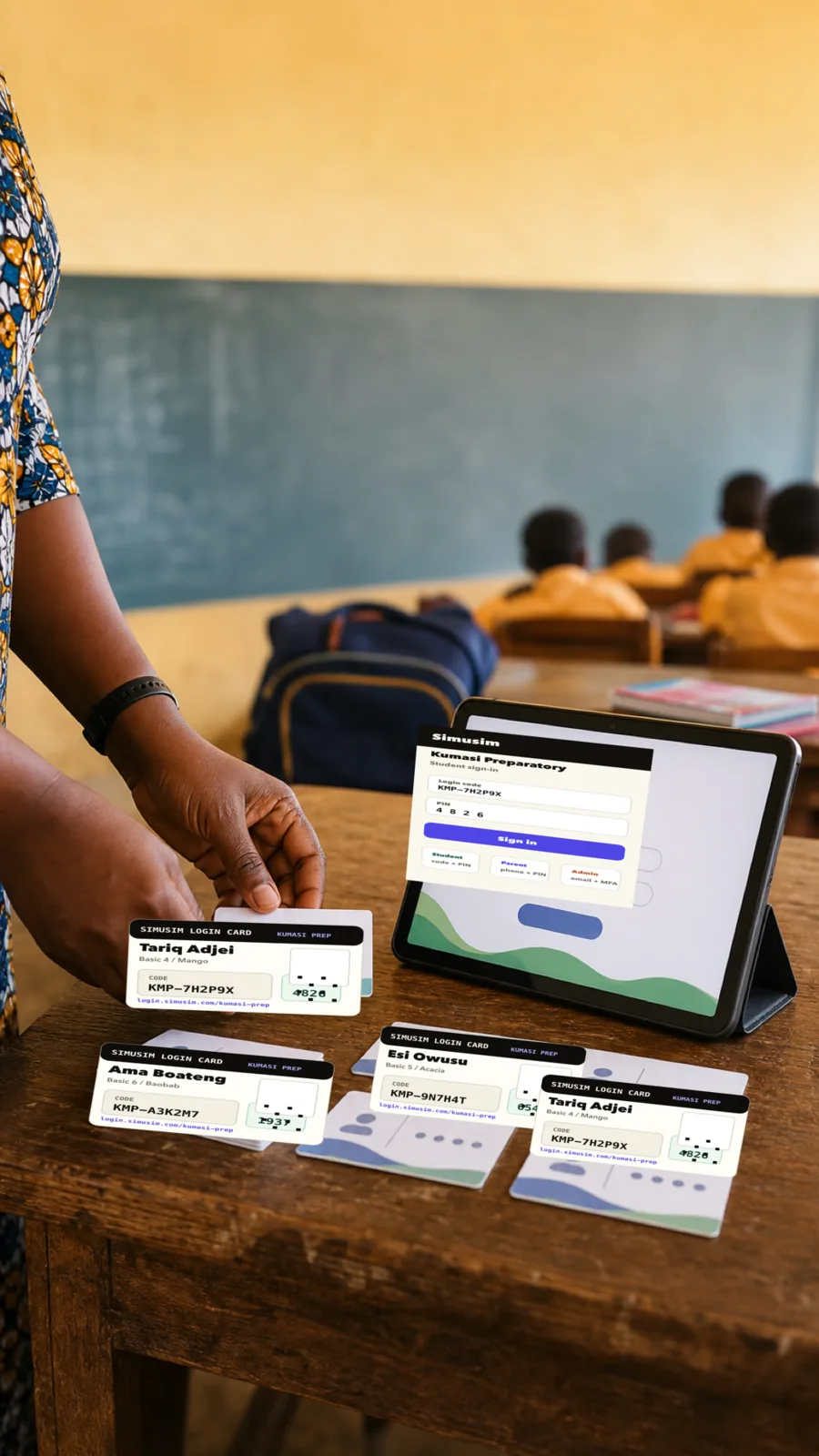
  • Printed cards. Bulk-import a class, print scissors-line login cards, hand them out on Monday.
  • SSO across every app. One sign-in → gradebook, attendance, lab, all of it.
No. 02

One authorization
service, no exceptions.

Every can-this-person-do-this-thing question goes through one engine. No copy-pasted middleware. No "well, this admin screen forgot to check." The cost of a check is microseconds; the cost of a leak is your school's reputation.

  • Belt & braces. API checks the role; the database checks the tenant.
  • Row-level security. Postgres physically prevents your data from touching another school's.
  • Audit log, always. Who did what, to whom, when, from where.
No. 03

One billing log,
no surprise lockouts.

The operations suite is free for schools that onboard their students — you only pay for the optional learning apps. And we don't make schools fight a credit-card form: pay by bank transfer or mobile money; platform staff records it; your access updates from the source of truth. Grace periods and reactivation are built into the subscription state machine — not negotiated by email.
  • Grace period, not guillotine. Falling behind dims your apps; it never deletes your data.
  • Mid-term reactivation as soon as platform staff records the cleared payment.
  • Per-app entitlement toggles. Platform staff can enable the apps your school is meant to use; the rest stay off.
A teacher using the Simusim Staff Console in class
Daily staff workflow

Teachers do the day's work in one place.

Roll call, gradebook, lesson plans, and CBT sit together so staff are not jumping between tools.

A bursar using the Simusim Finance dashboard
School finance

Fees and receipts live with the school record.

Bursars can see collections, balances, approvals, receipts, and reports without leaving the workspace.

§ 02 — The app suite

Student apps first, school ops connected.

The Simusim app suite shares the same identity, authorization, and tenancy foundation, but the learning products take the front row. Platform staff enable school-level app entitlements; school admins assign the right apps to the right people; the launcher sends each role to the surfaces they actually use, including face recognition for attendance marking where a school enables it.

Simu Primary ✦ vMaths ✦ Stories App ✦ Simu JHS ✦ Science Lab ✦ Face Attendance
Simu Science Lab virtual experiment screenshot
Learning apps The flagship products are the lessons, practice, lab work, and reading experiences students open.
The learning layer

The reason to care is what students get to use.

Simu Primary, vMaths, Stories App, Simu JHS, and Simu Science Lab sit in front. The school workspace still matters because it gives those apps clean identity, class assignment, permissions, payments, and support around them.
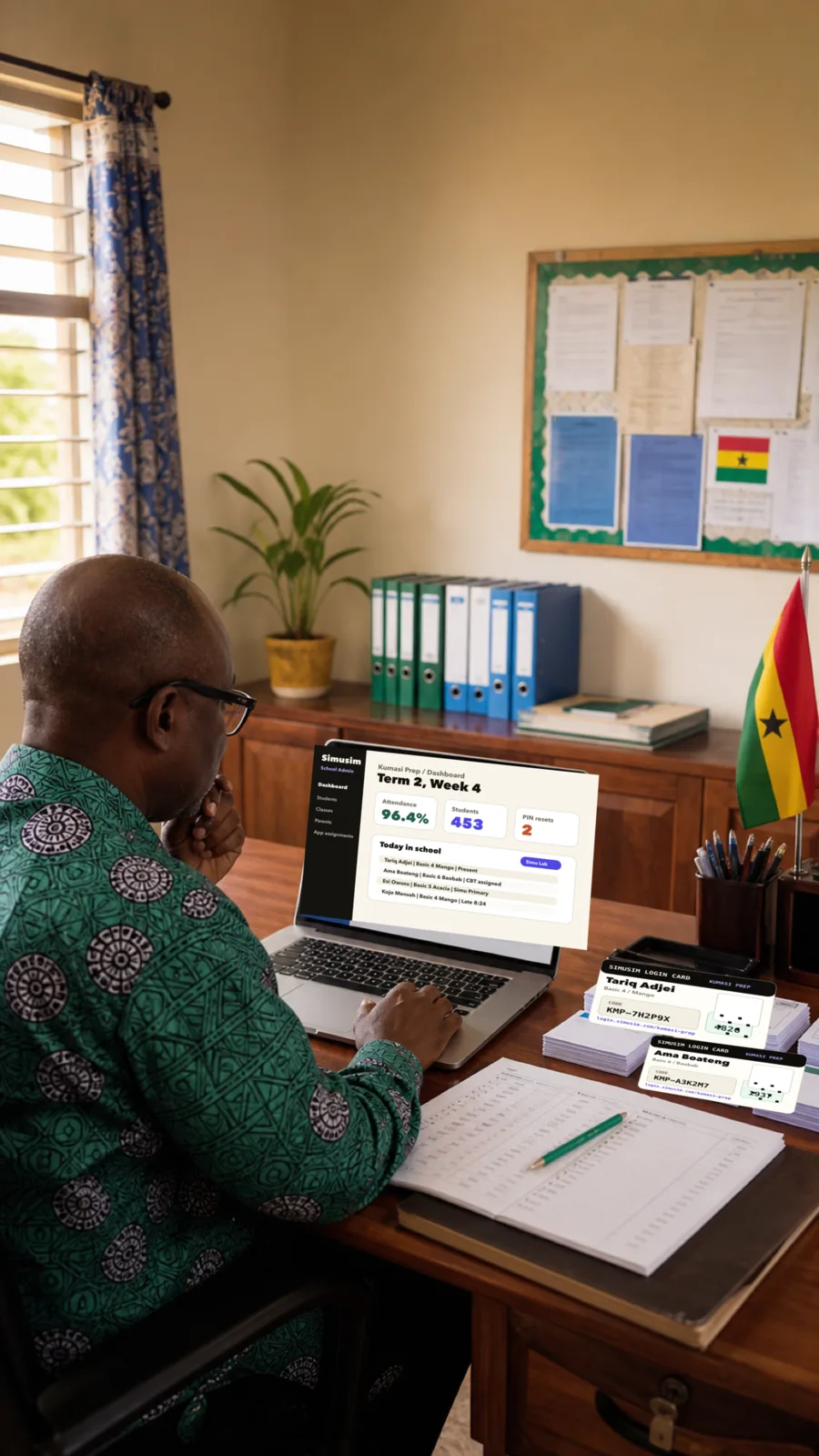
Simusim School Admin dashboard on a laptop
AdminUsers, cards, classes, apps.
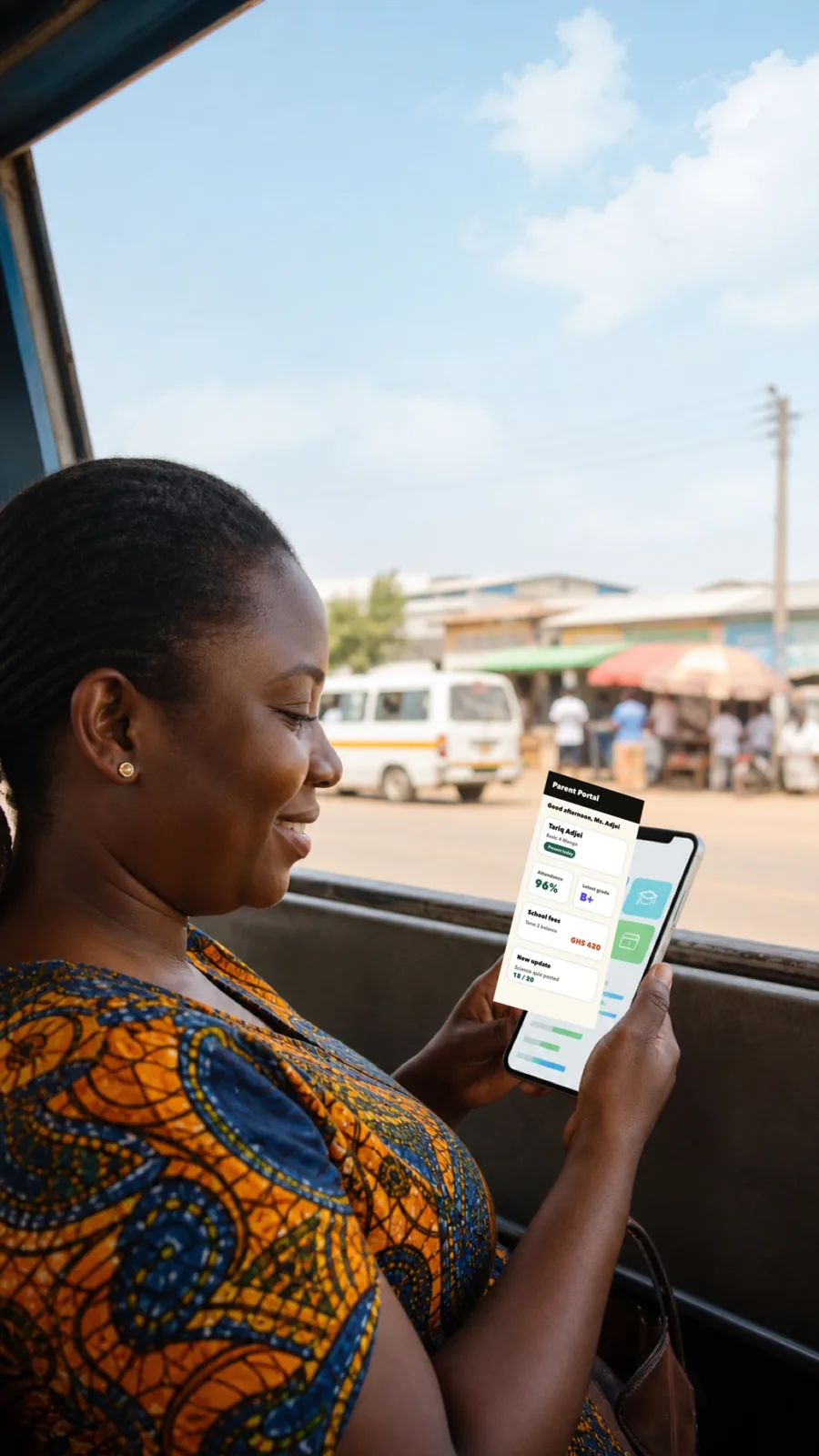
A parent viewing the Simusim Parent Portal on a phone
ParentAttendance, grades, fees, updates.
Simusim Finance dashboard in a bursar office
FinanceCollections, receipts, approvals.
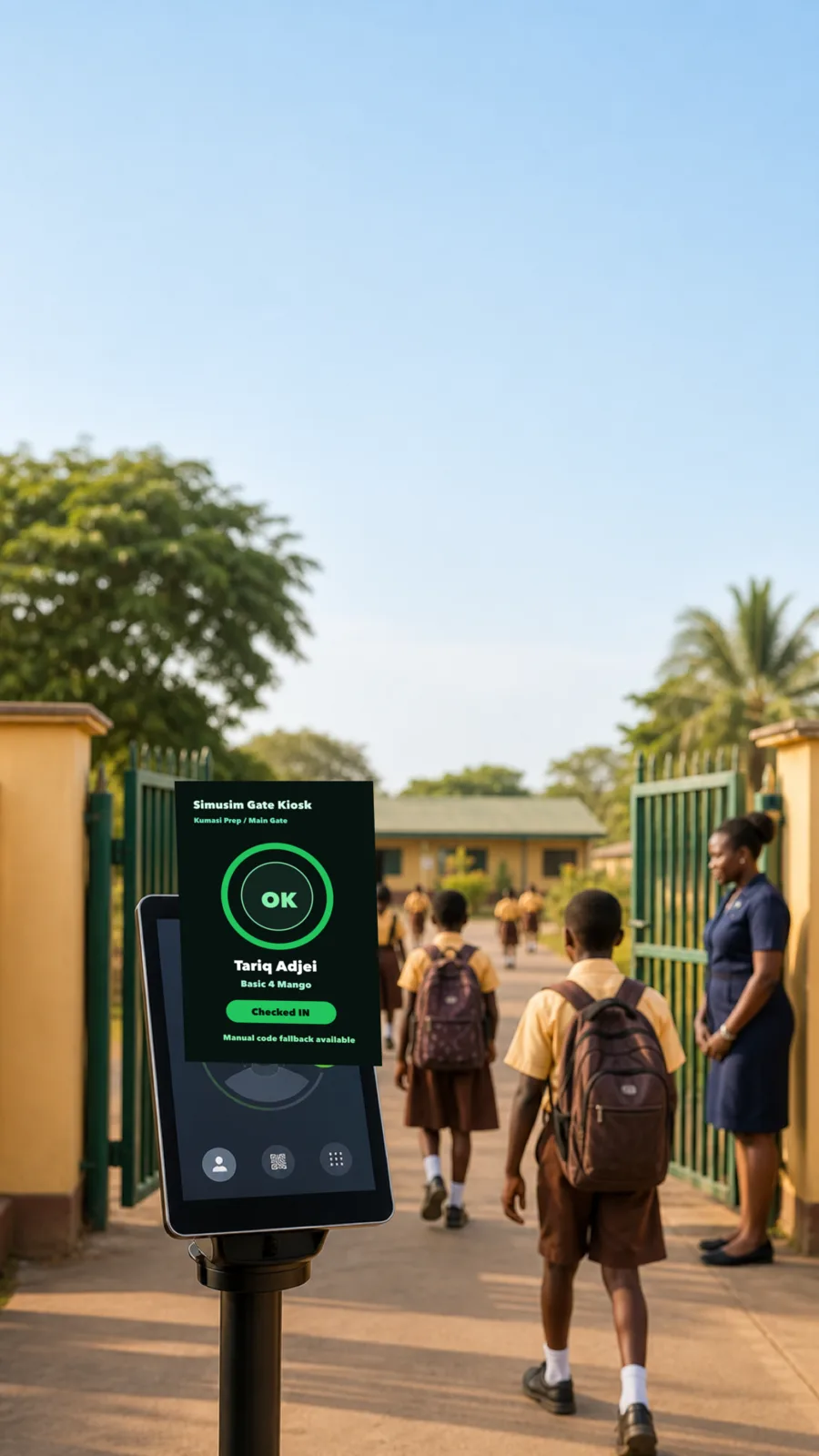
Simusim face recognition attendance check-in screen at a school entrance
Face attendanceOptional recognition-assisted check-in.
01
Simu Primary
For Primary 1–6

Maths and Science across the NaCCA primary curriculum, with playful interactions designed for shared classroom devices.

02
vMaths
For visual maths practice

Guided visual mathematics lessons with fraction bars, number lines, shapes, and practice packs students can manipulate.

03
Stories App
For reading

A student reading shelf with levelled stories, progress, and illustrated reading experiences that make literacy feel alive.

04
Simu JHS
For JHS 1–3

Junior-high curriculum coverage with diagnostic quizzes, BECE-style practice, and topic mastery that students can see.

05
Simu Science Lab
For Science

A virtual science lab. Build circuits, watch refraction, set up experiments, and observe results without waiting for equipment.

06
Student Portal
For students

One hub. Today's classes, due quizzes, last term's grades, and quick launches into the learning apps assigned to each student.

07
Parent Portal
For parents · phone-first

Attendance, grades, and the day-to-day at a glance — designed for parents who'll mostly check this on their phone, on slow networks.

08
Teacher Portal
For teachers

A teacher's day, in one screen: take attendance, grade work, post a lesson plan, launch a CBT — without four tabs and three logins.

09
School Admin
For school operations

Users, classes, rosters, parent-child links, PIN resets, credential cards, and per-user app assignments from one school-scoped console.

10
Finance
For bursars & admins

Fee structures, invoices, collections, receipts, waivers, trial balance, and student statements with a finance gate separate from classroom roles.

11
Face Recognition
For attendance marking

Optional face recognition for attendance marking at the gate or in class, with teacher review, manual fallback, and school-controlled use.

12
Gradebook
For subject teachers

Assignments, scores, term reports. Grade-weighting that matches your school's curriculum — not a curriculum that matches the software.

13
Lesson Plans
For teachers & heads

Author, submit, approve. Drafts to the head teacher; approval workflow built in. Print-ready lesson notes, every Friday.

14
CBT
For exam papers, online

Author quizzes once, deliver to the whole class, auto-grade multiple-choice answers. Built for the classroom, not the exam hall.

School apps share SSO. No separate logins.
Entitlements, role gates, and per-user assignments decide what each person sees.
Separate from school workspaces: Simusim Family lets parents create an independent family tenant, add children, and manage fixed-term access to Simu Primary, vMaths, Simu JHS, Simu Lab, and Stories App without receiving school-owned data.
§ 03 — The learning apps

What students actually open.

The Simu learning suite turns a Simusim workspace into a place children come back to: Simu Primary for Basic 1–6, Simu JHS for the BECE years, and Simu Science Lab — a virtual science lab built from the ground up for the NaCCA curriculum. vMaths gives guided visual maths practice, and Stories App gives students a reading shelf inside the same platform.

NaCCA-aligned ✦ Low-bandwidth ✦ Built for shared devices
Simu Primary · Basic 1–6

Maths & Science
for the NaCCA primary years.

Hands-on lessons that map one-to-one to NaCCA Basic 1–6 indicators. Built playful, dense with simulations, and designed for the kind of shared classroom tablet a real Ghanaian school has — not a Chromebook in a Bay Area lab.

  • Real NaCCA mapping. Every lesson tagged with the official Basic-school indicator code — from B3.1.1.1.1 to fractions, to the water cycle.
  • Ghanaian contexts. Cedi & pesewa, trotro, market, rice, cocoa. The maths feels local.
  • Offline once downloaded. Lessons cached on first run; works through dropped connectivity.
  • Stories, games & rewards. Daily goals, streaks, and a mascot that does not say "great job" sixty times an hour.
4 strands · Maths 5 strands · Science B1–B6
simu.simusim.com
SSimu Primary 🔥 12-day streak
Good morning, Tariq.
Ready to learn?
3 lessons today · B4 · Mango class
Unit Fractions
B3Maths
The Water Cycle
B5Science
Place Value to 1000
B2Maths
Heat & States of Matter
B4Science
Simu JHS · B7–B9 / BECE

For the BECE years,
by the BECE syllabus.

Maths and Integrated Science across all four strands of B7–B9. Diagnostic quizzes, mastery tracking, and BECE-style practice with structured working — designed for students who'll sit a real, paper-based exam.

  • Every indicator, every strand. All four Maths strands (Number, Algebra, Geometry, Data) plus all five Science strands — tied to the official NaCCA CCP 2020 codes.
  • BECE-style working. Practice with the structured working the markers expect — not just multiple choice.
  • Mastery, not points. Calm voice: "Correct" / "Not quite". Mastery indicators per topic. No empty praise.
  • Weakness clinic. The system finds the indicator a student keeps missing and sends them to the right lesson, not the next lesson.
9 strands · Maths + Sci BECE practice B7–B9
simu-jhs.simusim.com
JSimu JHS 12day streak 68%mastery B9
Continue practising B7.1.1.1.1
Modelling numbers up to a billion.
6 of 9 indicators Maths · Number
N
Number
Strong
A
Algebra
Growing
G
Geometry
Strong
D
Data
Focus
This week's BECE-style set 5 questions · structured working
Start
Simu Science Lab · Virtual science

A real science lab
that runs in a browser tab.

A virtual lab for the experiments most Ghanaian schools cannot afford to run on bench: build circuits, watch refraction, separate the food groups, set up the water cycle. A built-in tutor is grounded in the active experiment and offers hints, recap checks, and chat.

  • 130+ NaCCA-mapped experiments. Circuit Builder, States of Matter, Refraction & Dispersion, Water Cycle, Cell Types, Energy Transformation — tagged to B7–B9 Integrated Science strands.
  • Real interactivity. Drag components, change values, watch what happens. No videos pretending to be lessons.
  • AI tutor inside the lab. Uses experiment facts, misconceptions, and objectives to ask Socratic questions and stay on curriculum.
  • Designed for low-end devices. Each experiment in its own bundle — home page doesn't load every sim's weight.
133 experiments AI tutor B7–B9
simu-lab.simusim.com
LSimu Lab B7 Energy Circuit Builder
Build a series circuit
NACCA B7.4.2.2.1 · energy · current electricity
Voltage
9.0V
Resistance
220Ω
Current
40.9mA
Circuit Builder Refraction States of Matter Water Cycle Cell Types
A
Professor Ama · AI tutor Notice the lamp is dim. If we lowered the resistance, would the lamp get brighter or dimmer? Try changing the resistor to 100 Ω.
§ 04 — The people

Four humans, four front doors.

A five-year-old cannot remember a strong password. A grandmother does not own an email address. A teacher does not have time to receive a magic link. We do not treat humans like undifferentiated "users" — the front door fits the person walking through it.

Student ✦ Parent ✦ Teacher ✦ School Admin
Persona — Student

The student.

Children sign in with a school-issued code and a four-digit PIN. No email. No phone. No password they'll forget.

  • IdentifierKMP-7H2P9X — school-prefixed, six chars, no ambiguous glyphs.
  • Credential4-digit PIN. Randomly generated at enrolment. Resettable by the school admin.
  • Lockout8 attempts ➜ 30-minute auto-unlock. Audit-logged.
  • Lands inStudent Portal, with the learning apps assigned to their class.
Designed for shared classroom devices & school tablets
Simusim student login screen and printed login cards
Student loginA printed card gives the child exactly what they need: code, PIN, and school login path.
  • No email required. Students use a school-issued code and PIN.
  • Easy to distribute. Cards can be printed for a class or a whole school.
  • Resettable by admin. Lost cards do not become a support crisis.
Persona — Parent / Guardian

The parent.

Adults sign in with the phone number the school already has on file. No app store install. Mobile-first, low-bandwidth, works on the kind of phone parents actually own.

  • Identifier+233 24 *** **41 — phone numbers in E.164, always.
  • Credential4-digit PIN. Delivered to the parent in writing at enrolment.
  • Linked toOne or many children at the same school, with the link recorded by the admin at enrolment.
  • Lands inParent Portal: attendance, grades, updates, the day-to-day — a calm, mobile-first view of their child's week.
Optimised for the phone & the bus ride home
A parent checking attendance, grades, and fees in Simusim Parent Portal
Parent PortalA phone-first view for attendance, grades, fees, and school updates.
  • Built for phones. Parents can check the school day from a normal mobile device.
  • Clear child context. Each update is tied to the child and class.
  • No app-store step. The portal works from the school login path.
Persona — Teacher

The teacher.

Teachers sign in with their phone & PIN, land on Today, and run their day in one place. Attendance, grades, lesson notes, a CBT to launch — no four-app shuffle.

  • IdentifierPhone number — the one already on the staff roster.
  • Lands inTeacher Portal · Today — their class roster, their lessons, their open quizzes.
  • OwnsThe classes they lead. Authorization knows it; no admin-screen exceptions.
  • MobileAll-day mobile. Roll call from the back of class, in seconds.
Built for the actual rhythm of a school day
A teacher using Simusim Staff Console during class
Staff ConsoleAttendance, gradebook, lesson plans, and classroom actions are grouped around the teacher's day.
  • Fast roll call. Teachers can mark attendance from the back of class.
  • One staff surface. Lesson work, scores, and CBT sit together.
  • School-scoped access. Staff see the classes and students they are allowed to handle.
Persona — School Admin

The school admin.

The head teacher, the registrar, the IT lead. They onboard staff, import students from a spreadsheet, link parents to children, and print credential cards — from a real admin app, not a Google Sheet.

  • IdentifierEmail + password, with TOTP MFA strongly encouraged.
  • AuthorityScoped to their school. No other school's data ever shows up — not even by accident.
  • ToolsBulk import, parent ↔ child linking, PIN resets, per-user app assignments.
  • Lands inSchool Admin app — the workspace seen in the hero, above.
For the operations of a real, living institution
A school administrator working in the Simusim School Admin dashboard
School AdminOne dashboard for rosters, PIN resets, app access, and the printed cards schools actually use.
  • Bulk import first. Start from the roster schools already maintain.
  • Parent links included. Guardians connect to the right children during setup.
  • Cards ready to print. Credentials leave the system as something a school can hand out.
§ 05 — Security & tenancy

Quietly uncompromising.

Schools handle the data of minors. We treat that as the responsibility it is — with a model that physically prevents one school's data from touching another's, even if we wrote a buggy query. Belt, braces, and a third belt for good measure.

PIN-aware ✦ Per-tenant ✦ Audited ✦ Recoverable
  1. I.
    One org per school. Always.
    Every row in the database is stamped with an org_id. Every query is filtered by it. PostgreSQL row-level security enforces this at the engine level — not just the app. There is no "shared" data because there is no shared data.
  2. II.
    Authorization, twice.
    At the API edge: "is this user allowed to call this endpoint?" At the data layer: "does the row they're touching belong to their school?" Either failing aborts the request. We don't trust a single check with the data of children.
  3. III.
    PIN-aware lockout.
    A 4-digit PIN is, by maths, weak. So Simusim treats every failed PIN attempt as serious: 8 strikes lock the account for 30 minutes, every attempt is logged, and school admins can review login activity for their org.
  4. IV.
    Entitlements live outside the token.
    A lapsed subscription doesn't wait for tokens to expire. App access is checked against the Platform API at session start, so overdue or reactivated schools follow the subscription state without stale token claims.
  5. V.
    Audit log, by default.
    Key account, payment, entitlement, and parent-child relationship changes are written to the audit log with who, when, from where, and what changed.
§ 06 — Built for reality

For schools as they actually are.

Most school software is designed for a school that doesn't exist — one with unlimited bandwidth, parents on iPads, and an IT department in the basement. Simusim is built for the school that has none of those things and still needs to run a tight ship.

Mobile-first ✦ Low-bandwidth ✦ Print-friendly ✦ Cedi-native

PIN-first, by design.

Four-digit PINs are not a compromise — they are correct for who's using them. Children, grandparents, and tired teachers shouldn't be locked out by a password policy from a 90s bank.

Mobile is the desktop.

Every screen assumes a parent on a mid-range Android, on 3G, on a bus. The platform-admin and school-admin sides are dense and desktop-ready. The portals are gentle and phone-ready. Same data, different doors.

Paper still matters.

Login cards print on A4 in pre-cut grids. Term reports print to PDF without a designer's intervention. Class lists are made for the photocopier on the corridor.

Free ops, bank-pay for apps.

The operations suite is free for schools that onboard their students; you only pay for the optional learning apps — how schools pay: bank transfer, mobile money, the occasional cheque. We log the payment, we don't gate it on a Stripe webhook. Local realities, properly respected.

§ 07 — Onboarding

From spreadsheet to pilot workspace setup
in under fifteen minutes.

Our staff onboards your school personally. In a focused setup call we configure your slug, validate your roster, generate PINs, and prepare a print-ready stack of login cards. Card distribution and the first sign-in happens on your school's timeline — we're on the other end of every question.

Personal ✦ Predictable ✦ Reversible
I

Tell us about your school.

Name, slug, country, term start. A short setup form, with Ghana-first defaults for phone numbers, currency, and primary & JHS school levels.

Workspace provisioned
II

Upload your roster.

One spreadsheet. Students, parents, teachers, the parent ↔ child links. We validate the data, dry-run the import, and let you fix the broken rows in place.

Users created
III

Generate credentials.

We mint a unique code & PIN per student. Parents get a printed PIN letter delivered with their child's card. Teachers get a phone-PIN walkthrough. Admins pick their password & enable MFA.

Credentials issued
IV

Print & go.

Login cards exported as a single PDF, eight to a page. Apps assigned to classes. We send you a Monday-morning sign-in test you can do with a kid in five seconds.

Ready for pilot use

Every onboarding is done in a real call with Simusim staff. We do not believe in self-serve for institutions that handle children.

§ 08 — Sign in

Same platform, the right front door.

Pick who you are. Each door opens the correct sign-in for your school — or, if you bought Simu for your own family, your family account.

Family accounts

Parents manage children and buy Simu Primary, JHS, Lab & vMaths access directly. You sign in with your email & password — separate from any school.

Your children sign in to their learning apps with the student code & PIN you create for them — no separate child password to remember.
§ 09 — Join us

Help build school software that children actually touch.

Simusim is small enough that one strong person changes the product, and serious enough that the work lands in real classrooms, school offices, and family phones. We are accepting applications for people who want ownership, field contact, and the patience to build for Ghanaian school reality.

Product work ✦ School-facing work ✦ Curriculum work

Product Engineer

TypeScript Full-stack Remote-friendly

Own features across the learning apps and school workspace: Next.js interfaces, Fastify APIs, Postgres data models, and the tiny details that make weak-connectivity school days work.

  • Strong TypeScript, product judgement, and careful UI craft.
  • Comfort with authorization, data boundaries, and testable code.
  • Interest in education, offline-first UX, and low-end Android realities.
Application contact details

Use subject: Application - Product Engineer

School Partnerships & Implementation Lead

Ghana School visits Onboarding

Turn interested schools into successful pilots: run walkthroughs, gather rosters, train heads, bursars, and teachers, then bring the sharpest school feedback back into the product.

  • Confident with school leaders, parent concerns, and staff training.
  • Organized enough to manage pilots, checklists, follow-ups, and launch days.
  • Can translate messy field notes into clear product priorities.
Application contact details

Use subject: Application - School Partnerships & Implementation Lead

Curriculum & Learning Content Designer

NaCCA Primary/JHS Maths & Science

Shape the lessons, simulations, stories, quizzes, and practice flows students see. The job is part curriculum reviewer, part teacher, part editor, and part product thinker.

  • Experience teaching or designing Basic 1-9 learning content.
  • Strong eye for correct, age-appropriate, Ghanaian classroom language.
  • Able to review explanations, wrong answers, and BECE-style practice.
Application contact details

Use subject: Application - Curriculum & Learning Content Designer

Customer Success & School Support Associate

Support Training Families

Be the calm person schools and parents reach when a login card, class import, payment record, or portal question needs a clear answer and a fast follow-through.

  • Patient communicator across WhatsApp, phone, email, and live training.
  • Comfortable reproducing issues and writing simple help notes.
  • Careful with student data, parent trust, and school-day urgency.
Application contact details

Use subject: Application - Customer Success & School Support Associate

Work close to the problem. You will see how heads, bursars, teachers, parents, and students use what you ship. That feedback changes the roadmap quickly.
Build for constraints that matter. Low-end phones, patchy data, printed credentials, school fee realities, and child-safe identity are not edge cases here. They are the brief.
Own visible pieces. The team is small. Good work does not disappear into a backlog; it becomes part of the platform schools run on.
BOOK A WALKTHROUGH · 15 MINUTES · WITH OUR TEAM

The workspace your school already deserves.

Bring a roster — even a sample class is enough. We will show your school login path, the admin dashboard, the student cards, and the role-specific screens your staff and parents will actually use.

Email info@simusim.com
Phone 00233 54 911 2103
WhatsApp +233 54 911 2103

Copy any contact for school walkthroughs, family subscriptions, job applications, or platform questions.

Real humans · not a sales bot
Sample roster welcome
Simusim login screen and printed student login cards prepared for school onboarding
Walkthrough previewSee the login flow, dashboard, cards, finance, portals, and learning apps with a school example.