Wrapping up a term
At term-end you finish the parts of the report card only a teacher can write — conduct, remarks and comments — then the admin publishes. Here is your half of that handover.
~8 minStaff ConsoleHomeroom teachers
At term-end you finish the parts of the report card only a teacher can write — conduct, remarks and comments — then the admin publishes. Here is your half of that handover.
From a class in the Gradebook, open its wrap-up for the term. This is where conduct, remarks and comments come together before publishing.
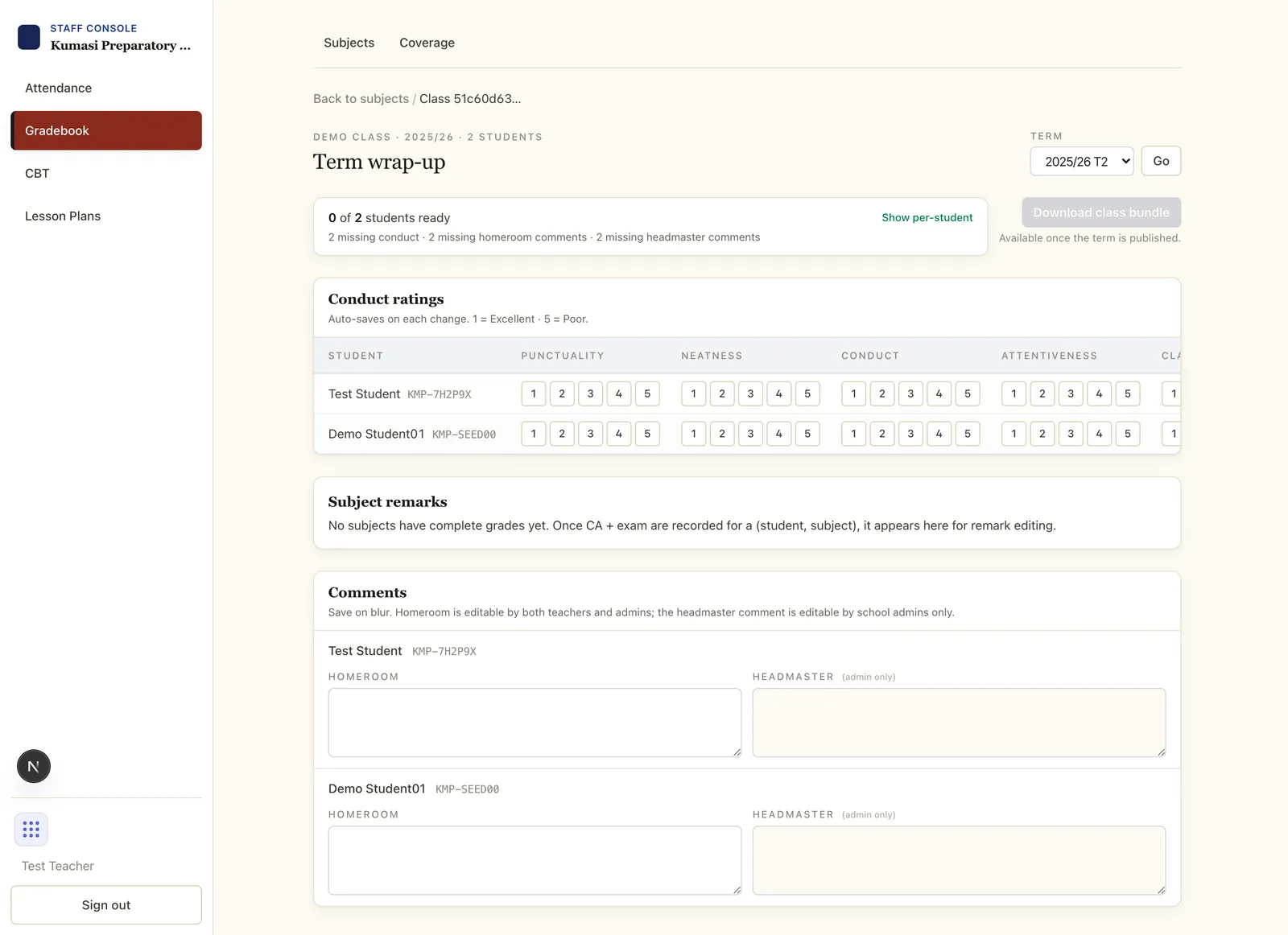
As the homeroom teacher, rate each student on the school's conduct traits (e.g. Punctuality, Responsibility) using the grid. The traits themselves are defined by your school admin.
Add a short remark per student for your subject. A sensible default is suggested from the grade band (e.g. an A maps to “Excellent”); edit it to say something specific where it helps.
A readiness banner flags any student or subject still missing grades, conduct or comments. Use Preview to see the report card as parents will, then tell your admin it's ready. Publishing the term — which locks grades and opens the parent PDFs — is the admin's step.
Email us and a real person on the Simusim team will get back to you. School staff can also reach us through their school's usual support channel.
§ 04Per-student comments
The homeroom teacher writes one overall comment per student — the holistic note parents read first on the report card.